If we have a widget that needs some background styling may be a color, shape, or size constraints, we may try to wrap it in a container widget. This widget helps us to compose, decorate, and position its child widgets. If we wrap our widgets in a container, then without using any parameters, we would not notice any difference in its appearance. But if we add any properties such as color, margin, padding, etc. in a container, we can style our widgets on the screen according to our needs.
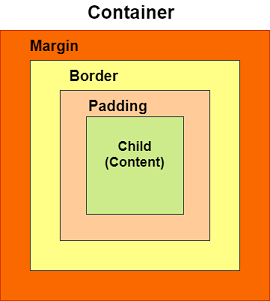
A basic container has a margin, border, and padding properties surrounding its child widget, as shown in the below image:
Constructors of the container class
The following are the syntax of container class constructor:
Container({Key key,
           AlignmentGeometry alignment,
           EdgeInsetsGeometry padding,
           Color color,
           double width,
           double height,
           Decoration decoration,
           Decoration foregroundDecoration,
           BoxConstraints constraints,
           Widget child,
           Clip clipBehavior: Clip.none
});
Leave a Reply